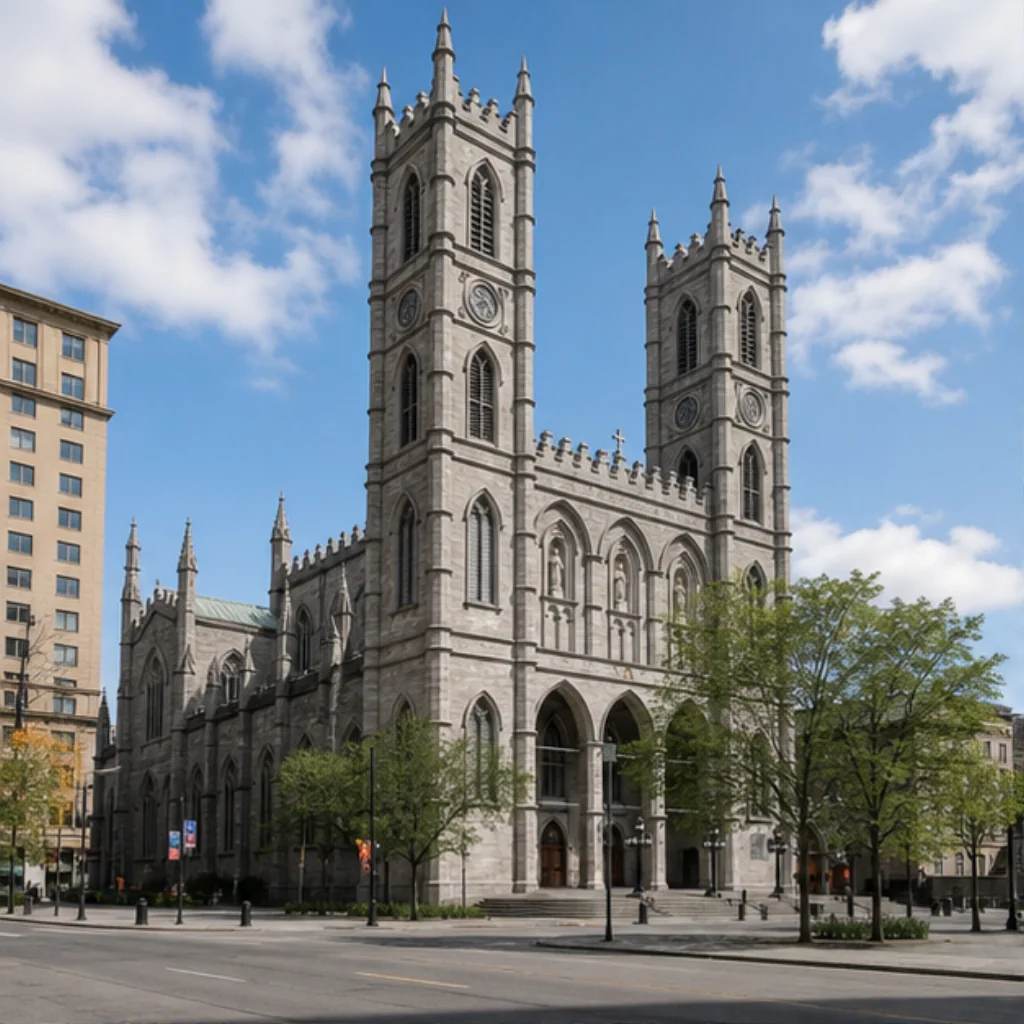
An Old Montréal photo walk can become a list of places you hurried past while looking at your phone. A more useful plan starts with two anchors and a small set of photographs: the stone and towers around Notre-Dame Basilica, then the water and open sky around the Old Port Clock Tower.
Think of this as a flexible outing to shape around your day. It is not a timed route or a report of conditions checked on foot. Use a current map for the connections, confirm access, and leave enough room to stop when something interests you. The point is to notice the change between the city streets and the waterfront, with yourself in a few of the pictures.
Give the outing two anchors and one stopping point
Start by deciding which visit matters more. If you have a Basilica booking, organize the walk around that commitment. If the riverfront is your priority, leave enough time and energy for it instead of spending the whole outing trying to perfect a single tower photograph. You can reverse the order when that suits your plans.
For each anchor, aim for three images: one wide view, one personal portrait, and one detail you chose because it caught your attention. This makes a small, varied record. Six pictures with different purposes can tell you more about an afternoon than dozens of almost identical attempts at the same composition.
Choose a stopping rule before you begin. Once you have a frame you like, put the phone away for part of the visit. If a booking runs long or the weather turns, keep one anchor and drop the other. Completing a route is less useful than having enough attention left for the place you reached.
At Notre-Dame, separate the building from the portrait
At Notre-Dame Basilica of Montréal, a vertical photograph can give the twin towers room above the square. Check the edges before taking it: are you accidentally cutting off a tower, or including a bright distraction that pulls your eye away from the building? Make that architectural frame first, while you can concentrate on the background.
Then change the job of the camera. For a portrait, move the person closer to the phone and let part of the façade extend beyond the picture. You do not need to keep the entire building visible to show where you are. If you are traveling alone, prepare that composition before asking someone for a quick photograph. Show them the frame and give one clear instruction.
A busy square does not require a failed photo session. Keep your request short, let others move through, and try a closer composition if the wide view is distracting. A stone detail or a quiet expression may end up carrying more of the visit than a perfectly symmetrical postcard.
Treat an interior visit as its own activity
An exterior portrait and time inside the Basilica call for different plans. The official sightseeing FAQ permits photography with consideration for other visitors. Check the guidance for the activity you book; that sightseeing answer does not establish photography permission during AURA. Consult the venue for current schedules and tickets.
Inside, begin by looking instead of immediately trying to photograph everything. Decide which detail made you pause. A photograph of light, color, or a small section of the architecture can be enough. Follow staff directions and avoid turning a shared religious space into a prolonged portrait session.
Keep that booking independent of Unlocked. Cobalt Nave is the name of an interior-inspired generated Experience in the app. It does not include admission, an AURA ticket, or proof that you stood in the depicted interior. Your own camera photographs remain the record of what you actually saw.
Let the waterfront change the composition
Use the Old Port’s visitor information to orient the waterfront part of your outing. Choose the connection on a current map, accounting for any closures and the pace that works for your group. Avoid fitting a fixed walking time between the square and the pier into an already tight schedule.
At the Old Port Clock Tower, start from an exterior view. A narrow vertical frame emphasizes the tower. A wider image can give the river and sky more space. For a portrait, check whether the tower appears directly behind someone’s head; a small change in your framing can separate the two subjects without moving into a restricted position.
Leave a little space around the person and take a second frame with the horizon level. If wind makes conversation and posing difficult, shorten the stop. There is no need to wait for the scene to resemble a saved image. Before arranging a shoot or planning access to an attraction, check the current site regulations. These suggestions do not depend on climbing the tower or entering the beach.
Complete the unlock while the place is around you
If you want an Unlocked keepsake, open the relevant Landmark during each stop and choose Unlock. The app checks your current location within its supported area. Confirm the unlock has succeeded before moving on; visiting Old Montréal generally does not unlock every nearby Landmark, and old photos cannot replace the check later.
After a verified visit, choose a curated Experience and create a private Memory from your reference photos when you have time. Notre-Dame offers Quiet Place d’Armes, Cobalt Nave, and Old Montréal Noir. The Clock Tower offers Harbour Morning, River Blue Hour, and Bridge Lines. These are creative interpretations, so their light and crowd conditions need not match your visit.
Keep both kinds of image for their different purposes. Your photographs preserve the afternoon as it happened. A generated Memory gives you another way to remember being there. Label it as generated when sharing, and retain the originals. The Montréal collection has all seven supported Landmarks; for a separate outing above the city, see the Mount Royal lookout photo guide.
Useful details
Frequently asked questions
Does this photo walk include entry to Notre-Dame Basilica?
No. This is a planning guide, not a tour or ticket. Arrange sightseeing or AURA directly with the venue, and check the photography rules for your particular visit.
Do I need to climb the Clock Tower for these photographs?
The suggestions use an exterior view of the tower and waterfront. Check current Old Port access information; this guide does not promise that the tower interior or observation area is open.
Can I unlock both Landmarks after I get home?
Only a location check completed during your visit can unlock a Landmark. Once you have verified each visit in its supported area, you can create Memories later from those unlocks.
Source notes
Sources
This article was prepared with editorial automation using the source pack below.
- Montréal Landmarks and ExperiencesUnlocked
- Sightseeing and visitor FAQNotre-Dame Basilica of Montréal
- Waterfront visitor informationOld Port of Montréal
- Site access and regulationsOld Port of Montréal